0of15read0 XP
How the internet actually works for non-tech workers
Explain in plain words what happens between typing a web address and seeing the page, naming the role of DNS (the phone book that turns names into numbers), IP addresses (the unique numbers that identify devices), the…
- Time
- 20–25 min
- Type
- exercise
- Bloom
- Apply → Create
- XP
- 100

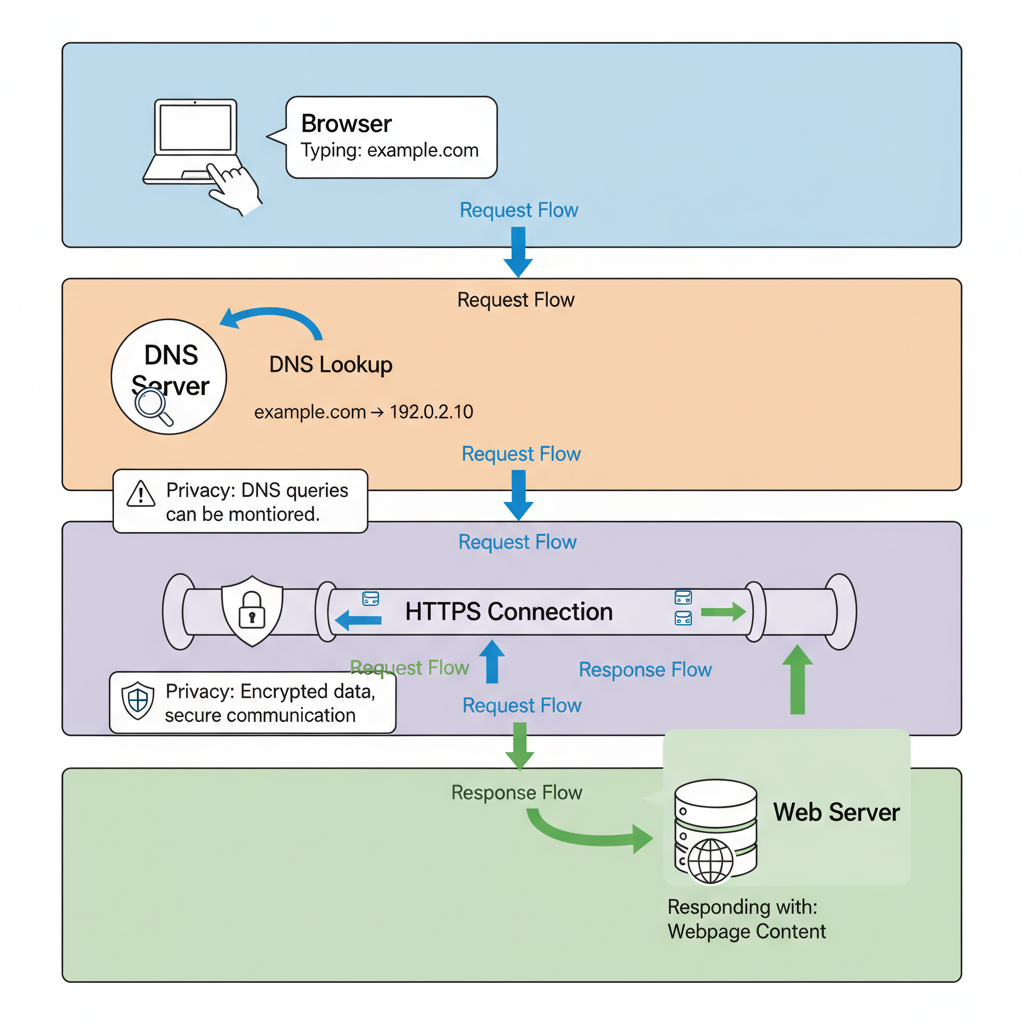
Architecture diagram for How the internet actually works for non-tech workers. A layered network architecture diagram showing how a web request travels from a user's device to a website and back. Top layer: user typing "example.com" in browser. Second layer: DNS server translating domain name to IP address (show the lookup arrow and numeric result). Third layer: encrypted HTTPS tunnel (visualized as a locked pipe or shield) carrying data packets between user device and web server. Bottom layer: the destination web server responding with webpage content. Use arrows to show request flow (blue) and response flow (green). Label each component clearly: Browser, DNS Server, HTTPS Connection, Web Server. Add small annotations explaining privacy implications at DNS and HTTPS stages. Use simple icons for devices and servers. Clean, left-to-right or top-to-bottom flow with distinct color zones for each network layer.
You'll be able to
- Explain in plain words what happens between typing a web address and seeing the page, naming the role of DNS (the phone book that turns names into numbers), IP addresses (the unique numbers that identify devices), the secured connection (HTTPS and the padlock), and the network you are on.[^1]
- Distinguish a secure web connection from an unsafe one by reading the address bar, the padlock icon, and whether the address starts with "https://" before entering sensitive information.[^1]
- Diagnose common everyday connection problems by deciding whether the cause is most likely a name lookup issue (DNS), the network you are on, or the website itself being down.[^1]
- Evaluate whether a website or link is trustworthy enough to enter sensitive information into by checking the exact domain name and the presence of HTTPS encryption.[^1]
Key concepts · tap to reveal
1/15·Watch·Beat 1 · Hook
0%
Hook
When the scheduling site breaks and everyone is waiting, can you name which link in the chain failed?
Your task Write a prompt that asks Claude to recommend the right AI setup for a real task you're facing — then weigh its answer against this lesson, "How the internet actually works for non-tech workers."
a strong prompt:role · context · task · format · example
Exercise · scenario
Mira manages a rural health clinic's patient appointment system. Staff recently complained that when they type the clinic website address, it sometimes takes 30 seconds before the login page appears, but other times it loads instantly. Mira notices the delay happens most often first thing Monday mornings. A vendor suggests 'your DNS lookup is slow because your router cache expires over the weekend.' Mira needs to explain to her non-technical office manager why typing a web address doesn't always work at the same speed.
Deliverable
You will produce a **one-page plain-language explainer** that you could hand to a non-technical coworker. Pick one real everyday situation you actually run into, for example loading your company's intranet, logging into a payroll or benefits portal, or opening a shared document link. Map that situation to the four links in the chain from this lesson: the web address you type, the name lookup (DNS) that turns it into a number, the secured connection (HTTPS and the padlock), and the network you are on.
Reveal model answer
This is primarily a DNS resolution issue, the system must translate the website name to an IP address each time the cache expires
Practice · Scenarios
0 of 8 revealed
Scenario 1 of 8
Svetlana teaches at a primary school and wants to show students a video during class. The school's network administrator tells her that YouTube is blocked, but she can access it fine on her phone using mobile data. Another teacher suggests 'just change the DNS settings on the classroom computer to 8.8.8.8 and it will work.' Svetlana needs to explain to the principal whether this workaround is appropriate and what it actually does.
Common misconceptions
“The internet is one central system run by a single company or government”
The internet is a decentralized network of networks with no single owner or control point. Many separate groups, including internet providers, hosting companies, the registrars that hand out domain names, and standards bodies, each run a different piece. That spread-out design makes the internet hard to take down, but it also means your data passes through equipment owned by several different organizations, each with its own rules. There is no one switch and no one operator behind it all.
Sources
- [1]Plain Language Guidelines (plainlanguage.gov)·Plain Language Guidelines (plainlanguage.gov) (2025) · Vendor
Submit your work for review
Paste your capstone artifact below. You'll get back a 4-level rubric grade, per-criterion feedback, and three concrete edits to strengthen it.